Messages, calls and files travel directly between your people — end-to-end encrypted, with no message database sitting on our servers. Built for factories and plants first, and for deep tech, research, law, healthcare, and anyone protecting their own IP.
Already have an invite code? Enter it here →
Built for
Not "trust us" — here's the actual mechanism, so you can judge it yourself.
It helps two devices find each other and set up a connection — nothing more. It never sees your message content, encrypted or not.
There's no central store of your conversations to request, breach or subpoena, because one is never built. What briefly passes through for delivery is encrypted and not kept.
Two devices on the same factory LAN connect directly once the handshake is done — zero relay, zero server bandwidth for the messages, files or calls that follow. The closest thing to air-gapped you can get while still being reachable from anywhere.
One-to-one and group chat, voice and video calls, screen sharing — encrypted end to end and routed directly between devices wherever the network allows.
Send drawings, scans, photos and documents peer to peer, encrypted in transit. Choose fast compressed sending or original quality when detail matters.
Assign work, break it into subtasks, set priorities and due dates. Board, list and calendar views, with reporting lines so a manager sees their team's work without chasing it.
Not a chatbot bolted on the side. Koot's AI can act on your actual tasks and documents, and you choose where it runs.
Paste a key from Gemini, Groq, OpenRouter or any OpenAI-compatible endpoint. Nothing to install, works on a phone, ready in about a minute. Requests go straight from your browser to the provider you chose — our servers never see your key or your conversation.
Connect Ollama and use open models — or your own fine-tuned models — on your own hardware. Nothing leaves your network at any point. This is the option for work that can never touch a cloud service.
What it actually does
“Create a task to replace the Line 3 bearing, assign it to Maintenance, due today.” It reports back on what's overdue, blocked or stalled — computed from your actual tasks, not guessed.
Ask for a shift handover, an SOP, a report or a slide deck and it lands in Koot Documents, formatted and editable. Ask again later and it updates the existing one.
Turn a conversation or a set of readings into a real Excel sheet, then keep adding to it — without leaving the chat.
Send a picture of a damaged part, a delivery note or a whiteboard and ask about it directly.
Type @ai in any group to summarise the conversation or turn it into a task or document. Whatever it creates is shared with that group automatically — and you approve each action before it happens.
Asked inside a group, it only sees and reports on work already shared with that group — not your unrelated private tasks and documents.
Documents, spreadsheets and presentations you can actually edit together — plus a real CAD tool underneath for the files that show up as DXFs, not text.
Written and edited right in the browser, shared with the people you choose, downloadable as real .docx, .xlsx and .pptx files when you need to hand one off.
A document lives with the person or group you shared it to — the same encrypted, device-to-device system as everything else in Koot, not a separate cloud drive.
Ask for a shift handover, an SOP or a report and it lands in Koot Documents already formatted and editable. Ask again later and it updates the same one.
Open the DXF your fabricator, architect or machine vendor already sent you — edit it, dimension it, send a clean file back. No CAD license, no separate app.
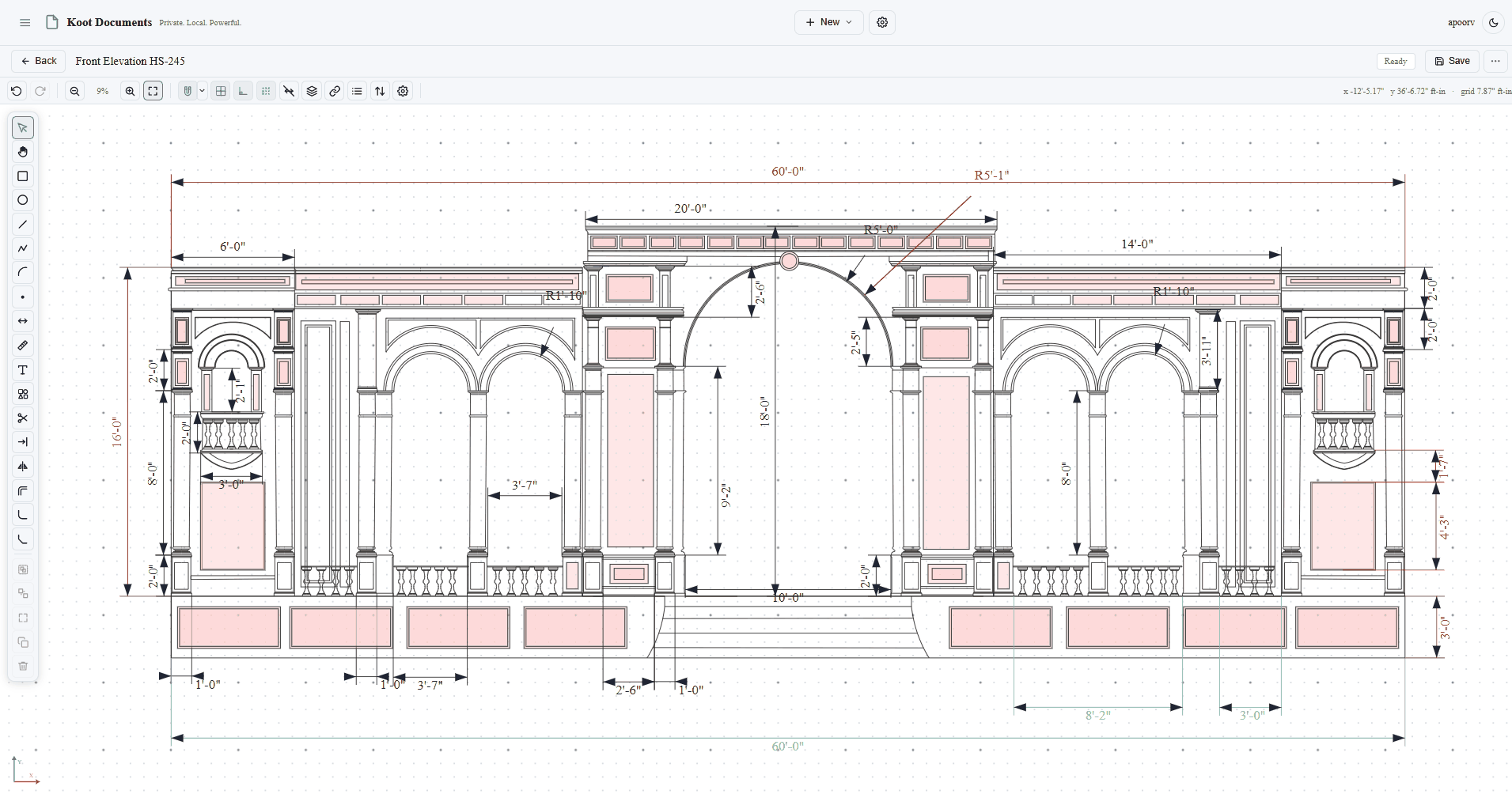
Import a DXF with layers, blocks, dimensions and arcs — not just simple shapes. Export a clean DXF back for a fabricator's own CAD or CAM software.
Snap to points, fillet and chamfer corners, trim and extend, hold shapes parallel, perpendicular or concentric — the tools an actual drafting job needs, not a toy shape picker.
Export a real vector sheet at a proper scale with a title block — the thing you actually attach to an email — not a screenshot, and not a file only another CAD user can open.
Describe a layout and Koot's AI drafts real, editable geometry — not a picture of one — directly into the same drawing you're working in.
A machine or fit-out vendor sends a DXF layout. Open it directly in Koot, lay it over your existing floor plan, and check clearances — no separate CAD seat, no conversion step.
A supervisor adjusts a duct run or a partition on the actual drawing, adds a dimension, and the fabricator gets a proper PDF back within minutes — not a photo of a printed markup.
After an install, update the drawing to match what was actually built. The next contractor works from what's real, not from the original plan someone forgot to revise.
Describe a layout in chat and the AI drafts the actual geometry — dimensioned, editable — ready for a drafter to true up. Not a wasted afternoon starting from a blank canvas.
Your people, your machines and your work in one private place — administered by you.
Shop floor, maintenance, QC, supervisors and office staff in the same encrypted system, on whatever device they already carry. No app install, no per-device setup.
Your own admin panel: issue invite codes, add and remove people, set roles, and revoke access the moment someone leaves. Seats are yours to manage.
Set who reports to whom once, and task visibility follows automatically — managers see their team's work without anyone forwarding anything.
Because traffic goes device to device, two people on the same plant WiFi talk at LAN speed. Designed for sites where bandwidth is thin and reliability isn't optional.
Run Ollama on a machine in your own building and give the whole team AI assistance that never sends a byte outside the site.
There's no central archive of your conversations to request, breach or subpoena — because we never build one.
A bridge built for your specific setup reads your existing MES terminal, machine logs or ERP exports — read-only, on your own network. No rip-and-replace, and your legacy systems stay exactly where they are.
Specifics, not adjectives — so you can judge it yourself.
Our server does signalling — helping two devices find each other — and passes data between them. It doesn't keep an archive of your conversations; a message to someone who is offline waits on your device until they're back, and a few things like task assignments are held briefly until delivered.
Each pair of users derives their own keys (ECDH P-256), and content is encrypted with AES-256-GCM. Private keys are non-exportable and never leave the browser that made them.
Messages, tasks and documents are stored locally on the machines that use them, and sync directly between the people who are meant to have them.
Because Koot doesn't keep your company's data on a Koot server, how it is stored and backed up is up to your organisation. Encrypted backup is built in. If you want more — storage on a server in your own building, or a folder you already back up — we set it up around how you already work, and only what you ask for.
Start a free trial in two minutes, or tell us about your setup and we'll plan a rollout with you: your layout, your machines, your shifts.